
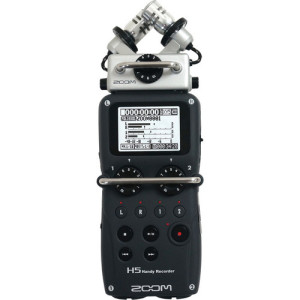
 I’ve been using Zoom digital audio recorders since the day I began podcasting. In fact, my very first podcast was recorded using only the Zoom H2 digital audio recorder. Zoom has always had a reputation for producing cutting edge audio and video products for professionals and consumers alike. When Zoom released their flagship digital audio recorder, the H6, last year, I was blown away. While the Zoom H6 has an amazing amount of features and flexibility, I simply could not justify adding it to our studio since it also carries a price tag of $399. When Zoom announced the H5, I got really excited. It looked like the H5 would pack in the features I most wanted at a $270 price that was in my comfort zone. I pre-ordered a Zoom H5 and tried to patiently wait for it to arrive.
The Zoom H5 arrived to the studio on July 14. Here’s the unboxing and first look video that I did when it arrived.
[pb_vidembed title=”Zoom H5 Unboxing and First Look” caption=”” url=”http://www.youtube.com/watch?v=cRoGkAm_J7w” type=”yt” w=”640″ h=”360″]
Now that I’ve had a few days to use the Zoom H5 as part of my regular weekly productions, I’m back with an in-depth demo and review of the Zoom H5.
[pb_vidembed title=”Zoom H5 Zoom H5 Demo and Overview” caption=”” url=”https://www.youtube.com/watch?v=6XrPwMqfUfU” type=”yt” w=”640″ h=”360″]
The Zoom H5 impressed me the moment I first held it. Although spent a lot of time looking a pictures and videos of it online, I still expected it to be larger. The Zoom H5 fits very comfortable in the hand and weighs less that I imagined. All of the controls are easy to reach and manipulate with a single hand. The Zoom H5 does not feel cheap at all. The body of the Zoom H5 is made of a rubberized plastic that will keep the device firmly in your hand. Like its big brother the Zoom H6, the Zoom H5 has interchangeable capsules. It ships with the XYH-5 capsule which has a pair of condenser microphones in a 90° pattern. The microphones are housed in a rubberized shock mount which will reduce noise from handling the device, and the XYH-5 capsule is made from a durable metal housing.
In addition to the XYH-5 capsule that ships with the Zoom H5, the Zoom H5 is also capable of using any of the other removable capsules that Zoom makes for the H6. These capsules include the EXH-6 Dual XLR/TRS Combo capsule, SGH-6 Shotgun mic capsule, XYH-6 XY mic Capsule, and MSH-6 Mid-Side mic capsule.
The Zoom H5 also includes 2 built-in XLR/TRS input ports. Each port is also capable of supplying up to 48v of phantom power to your phantom powered devices. The XYH-5 capsule also includes a line-in port that allows you to connect an auxiliary input device such as a media device, iPad, computer, etc.
As a podcaster, the Zoom H5 gives me all I need to record professional level audio whether I’m in studio or on the road. I could literally pack the Zoom H5, an XLR mic, my iPhone, and two cables and do a professional sounding podcast from ANYWHERE!
In addition to the incredible amount of inputs on the Zoom H5, there are also two outputs. One output is the headphone jack, complete with a volume control. The second output is the Line Out. The Line Out allows you to output the audio to your DSLR or other recording device so you can easily deliver high-quality audio directly into your video recordings.
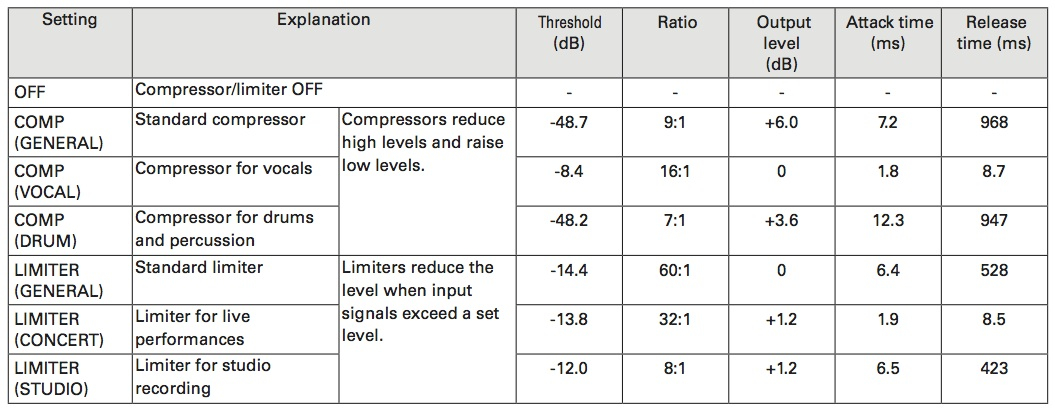
The Zoom also comes packed with 3 different compressors, 3 different limiters, and a low cut filter. The low cut filter can be set to 80Hz, 98Hz, 115Hz, 133Hz, 150Hz, 168Hz, 185Hz, 203Hz, 220Hz, or 237Hz. Here’s a chart of the compressor and limiter settings.
The Zoom H5 also allows a wide variety of recording options. You can record in stereo mode via the 2 XLR/TRS inputs, the XY input, or the Line-In port. However, you can also combine the XLR/TRS inputs with either the XY input or Line In and record up to 4 tracks at a time with Multi File mode. Here are the recording options available in Multi File Mode and Stereo Mode.

The bottom line is that the Zoom H5 is a near perfect recorder. If you need more than 2 XLR or TRS inputs, you can add the EXH-6 capsule. If you need more than 4 XLR or TRS inputs, you’ll want to get the Zoom H6. However, for most podcasters and professional musicians, I believe the Zoom H5 will deliver the functionality and performance they need.
If I could improve the Zoom H5 I would add a noise gate and include a higher capacity memory card (it ships with a 2 GB MICRO SD card). However, these are relatively minor issues and don’t downgrade my opinion of the Zoom H5. I give the Zoom H5 an A++ rating!
Pick up the Zoom H5 at B&H Photo or Amazon today!
UPDATE: I received a comment on YouTube about the noise floor of mics plugged in to the 3.5mm jack of the X/Y Capsule. Here’s an audio sample that I did that compares the noise floor of the built-in X/Y capsule, a lavalier mic (the Audiio Technica ATR3350), and the HTDZ HT-81 microphone. As you can hear in the sample, the noise floor will vary quite a bit depending on the microphone. All 3 microphones are condenser mics and will experience a higher noise floor than a dynamic mic. When using condenser style microphones, it’s important to use them in an environment that is wide open so sound can dissipate over distance, or that is well insulated so that the sound waves can’t echo back into the microphone. NOTE: This audio hasn’t been modified in any way with compression, limiting, noise reduction, lo cut filters, normalization, etc. It is the raw audio as recorded by the Zoom H5. It’s also worth noting that the buzz you hear in the sample of the ATR 3350 is very likely caused by a low battery. I haven’t used the mic in a while and I’m sure the battery needs to be changed. When it has a good battery, I’ve never known it to have the buzz in this sample.
Zoom H5 Noise Floor Test
Two really great reviews! Listening to them really affirmed the decision i’d already made to buy the Zoom H5 Handy Recorder. It hasn’t arrived yet but like you i’m really looking forward to the knock at at the door!
I am a beginner at this and I think it would be great if you could do an instructional video showing setting up. Choices of settings and why you’ve chosen them etc.
Many thanks
Pete
Hi. Such a great review….
When you are recording on the Zoom H5 using an XLR dynamic microphone (like the Heil PR-40), do you use any of the compression or limiter settings offered by the Zoom H5? Or do you do that stuff with software afterwards? Thx!
I typically don’t use the limiter or compressor, but I have used both. If I do, I use the compressor on the vocal setting and the limiter for studio recording.
Great. Thanks for the feedback.
Thanks for the great review. You said: “I could literally pack the Zoom H5, an XLR mic, my iPhone, and two cables and do a professional sounding podcast from ANYWHERE!”
Could you explain more about how that set-up would work? I’m interested in doing in-person podcasts and trying to figure out an easy solution. Thanks again!
Hey Jeena! The setup would be the Zoom H5, the XLR mic of your choice, an XLR Cable, a 3.5mm audio cable, and the device of your choice. You would connect the mic to the H5 via the XLR cable into input 1 on the H5. You would connect your device to the Line In input via the 3.5mm audio cable. If you have an iOS device, you can play audio clips with the BossJock app. Then you’ll just need to make sure the inputs are activated, you do a sound check to make sure your mic and the mobile device are both coming in at the appropriate level (between -12 adn -6), and hit the record button. Here’s a link to a podcast that a client of mine did using just the H5 and 2 XLR mics. In this example, the audio clips were added during editing. http://www.watchingtheamericans.com/wta-21-season-3-episode-3-open-house/
This reply is getting close to what I am looking for — I think!
I am new to ALL of this audio stuff. Trying to learn about digital audio recorders for a future podcast. Bear with me. Yada yada yada…. : )
I want to be able to:
Record two XLR mics with the H5 while using Bossjock (or Sound Byte by Black Cat Systems) on my iPad to play clips, intros, outros, etc. It’s not important for me to use the Bossjock/Sound Byte to record in this scenario as I want to use the H5 for that. This is for when I am away from the mixer.
I’ve seen Ray Ortega go ATR 2100 USB > iPad with Bossjock > DAR (though the audio is also recorded in Bossjock).
But is there a way to use two XLR mics while still using the iPad with the Bossjock/Sound Byte? In Ortega’s set-up, the DAR is essentially redundant and unnecessary — a back-up I suppose.
I hope that makes some sense. I want to use two XLR mics, play clips with Bossjock/Sound Byte, and record it all into H5. Is that possible?
FWIW, there is a big lack of awesomely done how to videos about the Bossjack. There are a lot of videos out there, but very few good ones with proper lighting, diagrams, slides, and simple language. Could be a great idea for a series! : )
Thanks!
Dan, YES this is absolutely possible. You’ll simply plug one XLR mic into input 1 and one XLR mic into input 2. Then you’ll take a 3.5mm audio cable out from the headphone jack of the iPad, and plug it into the 3.5mm input jack located in the XY capsule. Make sure inputs 1, 2, L & R are all activated, adjust all the volumes so that each input is coming in between -12 and -6, and you’re all set.
Oh my goodness! I totally missed the latter part of the demo video where I think you did exactly what I am hoping to do. I am so sorry. I don’t see a way to edit my previous comment. I have no idea how I missed that.
So, that should allow me to use one or two XLR mics, use the Bossjock as a cart, allow me to monitor through my headphones, and record everything onto a memory card on the H5. Right?
Is it also recording onto the Bossjock?
This is so awesome! Thanks for the videos and everything. I think this is exactly what I have been looking for. Sorry again about the extra comment.
No worries about missing that part of the video, Dan. I always welcome your questions. You’re right, everything will record right onto the memory card of the H5. You can record with Bossjock, but it’s not at all necessary. Since the XLR mic isn’t connected to the iPad, it would be recording your voice via the mic that’s built-in to the iPad, so the recording quality wouldn’t be nearly as good as what the H5 will be recording. Let me know if you have any other questions.
Thank you! This is so helpful. Questions:
1. Is the audio quality of the Bossjock cart going to be compromised at all by feeding it to the H5 via a 3.5mm audio cable, or does that matter?
I am researching mics and given that I have a terrible room for recording audio, in addition to throwing in a rug, some curtains, and some panels, I want to get a dynamic mic. I think that will work best for me. I am looking at everything from the STR2100 to the Heil PR40.
2a. As of March 2015, what are a handful of top contenders I should be looking at when it comes to this kind of mic? Many of the lists I have found are six months, a year, or more old.
2b. I have read about how much mics like the Heil PR40 and the Shure SM7B need a significant preamp. Would you mind explaining what this means, and how it is accomplished? Is this something the H5 or a mixer provides?
Thanks!
1. No, the quality of Bossjock won’t be compromised by the 3.5mm cable.
2a. You definitely want to go with a dynamic mic. I recommend the Shure SM58, Audio Technica ATR2100, Audio Technica AT2005, or Heil PR40. I have some demo videos for them as well as a portable podcast package over on my other website at http://www.propodcastsolutions.com/podcast-equipment/.
2b. The preamp is what amplifies the sounds picked up by the microphone. You’re essentially adjusting the preamp when you adjust the volume knob on a mixer. Each channel has a separate preamp. Audio mixers have preamps, and so does the H5. Good preamps will be able to amplify the sounds without introducing hiss or buzz into the audio. Mackie and Soundcraft (among others) are known to have good preamps. Behringer is not known to have good preamps. A microphone like the H5, which is a large diaphragm microphone, is known to need a strong preamp to get the desired volume. This usually means that you’ll need to turn up the volume, which raises the risk of introducing hiss or buzz. As you saw in the video for the H5, the preamps on it are strong and clean. It had no problem with the Heil PR40.
This is great! I’ve been on a ton of sites, but your helpful replies have put this post up there with Ortega’s video on setting up the Mix/Minus. LOL! Bookmarked and shared. Moreover, I will definitely be making a one time donation to the cause thanks to all of your prompt, clear, and helpful replies.
I am heading over to check out that link you gave.
Cheers!
I’m glad to help. Ray Ortega is awesome and his mix minus video is fantastic. I haven’t made my own because it’s easier to send people to that one. Let me know if there’s anything else I can do for you.
I’ve got another question for you and don’t know of any better place to put it. If there is a post somewhere about this, please let me know!
Having looked at your Product Package lists, I am considering the Soundcraft EPM6. Do you have, or do you know of a good video tutorial walking through the set-up and use of this mixer? I’ve done some googling, but I have not been able to find much yet.
Second, I am totally new to mixers. Do you know of any good tutorials in general that you trust? I’d really like to find videos for the mixer I would end up getting, but anything helpful is, well, helpful.
Perhaps this would compete with your services, but a well produced series on the EPM6 would go far toward selling the packages, I’m guessing. 🙂
Thanks again!
dude, you’ve gotta use the old google machine and start doing some of your own research!
Hey Dan, I don’t know of any videos for the EPM6. It sets up pretty much like any other mixer. If you end up getting one of the equipment packages I have featured on Pro Podcast Solutions, let me know and I send you a diagram that shows how to set it all up.
Sounds good. Thanks again for your time. Last night I picked up an H5 through one of your equipment packages links. Hopefully that will translate into a commission for you. I also made that donation.
I have spent the last few days using “the old google machine” and doing research and that’s exactly how I found you – and a bunch of helpful answers that I trust. : ) Of course, if I decide to pick up that mixer (or anything else through BH), I will try to do it through you, too.
Cheers!
I think you’ll like the H5. It’s so versatile and powerful. I’m happy to help with any other questions you have down the road. And thanks for using my B&H link. I really appreciate it!
When using the H5 XY mike and the H5 for recording, how would you about set up of the H5 when using bossjock?
If you’re using the XY mics for recording, you won’t be able to use the Line In that’s located on the side of the XY capsule. So you’ll need to get a Y cable that is 3.5mm on one end and dual 1/4″ mono plugs on the other end. Then you can connect your Bossjock device to inputs 1 and 2 with channel 1 recording the left signal from Bossjock and channel 2 recording the right signal from Bossjock. Make sure that you set the volume knobs to input 1 and 2 the exact same.
Would using the mono mix setting in the H5 and only using one 1/4 mono plug using only input 1 or 2 do the same?
Yes, that would work. Just don’t plug a stereo cable into the mono input of the H5. Doing so will cause some of the audio to cancel out other parts of the audio and it will be distorted.
How can I make the H5 work with a Giant Squid Omni Lav plugged into the H5’s line in on the default XY module? So far all I’m getting is an extremely faint signal, almost inaudible. What am I doing wrong?
Figured it out! You have to go into the in/out settings in the H5 and turn on plug in power. I was having the same problem! Hope this helps.
Thanks, Jonathan!
Was scouring the manual for that and missed that. Couldn’t figure out why my lav mic wouldn’t show up in recordings but I could see the XY mic was disabled when I plugged the lav in.
Wow – glad you figured this out – I was trying to find some info on this!
This was a great review, not to mention a great resource for Zoom H5 owners! Thanks to this page, I recently purchased an H5 as my first digital recorder and couldn’t be happier. 🙂
I do have a question (more of a curiosity, really) I’d like to toss out for discussion, though: how do I connect the 1/8″ stereo headphone jack of a Galaxy S4 – or any cell phone or iPhone – directly to one of the two 1/4″ TRS inputs?
My understanding is that the industry TRS standard by its very nature is a *stereo* connector, and the H5 manual appears to bear this out in the included schematic illustrated on Page 6. So…… I plugged one end of a 1/8″ stereo patch cable into a cell phone’s headphone jack, and plugged the other end of the patch cable into the H5’s Input #1 using a 1/4″ to 1/8″ stereo adapter. The results were, well, HORRIBLE.
What am I missing?
It’s a phase cancellation issue. To connect a stereo connector to the H5 you have 3 options. 1- connect it to the Line In port that’s built in to the XY capsule. 2- Use a 3.5mm stereo (going into the Galaxy S4) to 1/4 mono (going into either TRS jack on the H5) cable. 3- Use a 3.5mm stereo (going into the Galaxy S4) to 2 1/4 mono plugs (a Y cable) where each of the 1/4 mono plugs are plugged into input 1 and 2 on the H5.
Thanks for all the input. I have specific question. I am a drummer. Rank beginner to recording. Simply trying to record myself playing to covers of classic rock with music coming from speakers. Have just bought a Zoom H5 and an iphone 6. Can I connect the Zoom H5 for audio with the iphone 6 for video? Hoping to disable the iphone audio. If so, how…in detail please. Also, since drumless tracks are impossible to get from original recording artists from the 60’s and 70’s, do you have any suggestions as to the best way to record without my drums overriding the whole production? Some way to connect the stero tuner directly to the Zoom H5 and simultaneously record my drums through the XY mics while using the iphone 6 for video? Sorry if this is way off but as I said, I am a beginner.
Thanks so much in advance for any help you can provide. BTW, I do not have either a DSLR or a camcorder.
That’s almost a very easy task. You should play music not through speakers but via headphones. Then you shoot video with iPhone, drums – with Zoom, after that – copy everything on your PC and then line sound w/ video. Quite easy to learn actually. Good luck!
Just wanted to send a quick THANK YOU for the articles/answers/info on the ZOOM. Even though I’ve had opportunities to record in studios since “way back in the 2-inch tape days” (i.e. the 80s), I didn’t learn much. For the last couple of years, I’ve been trying to cram, catch-up, shovel, learn, devour anything/everything that I can in regards to recording.
Then somebody gave me the ZOOM H5 as a gift!?
That put some pressure on…No, that overwhelmed me to learn faster and find out everything I could/can regarding recording (mostly percussion) with this thing.
The resources on your site have helped me learn lots about this gadget and TONS about recording in general – THANK YOU!!!
Hi!I just got the zoom h5 to do radio recordings in the field. i’m used to the hn4, and that had an easy way of making the X/Y mic do the recording in MONO – a setting I always used when I was interviewing one person. I cant seem to find that setting on the h5 – maybe you can help?
Excellent review….although, I’m very new to this so I need things spelled out for me.
My question is: Right now I’m torn between the H6 and the H5. I’m looking to do a Pod Cast with 3 other people. Does the H5 have that capability with out purchasing the extension?
We are using the H5 to shoot a promo video. We are absolute beginners using it, and your video has been very helpful. What we are confused about is Phantom Power. We see that we can use batteries, but they go very quickly. Is there some kind of power source we can plug into it so that we are not using batteries?